
Wondering how to read
Reading
Based on extensive analysis of current methods and tools, this guide provides a systematic walkthrough of every option. You will discover exactly how to prepare, transfer, and read
Key Facts
- Optimized Formats Are Crucial: For the best quality,
manga files should be converted to Amazon’s AZW3 or KFX formats, as they offer superior image rendering and performance on Kindle devices compared to raw CBZ/CBR files.- Kindle Comic Converter (KCC) is the Standard Tool: KCC is a free, widely recommended open-source tool specifically designed to optimize
manga and comics for Kindle e-ink displays by enhancing contrast and ensuring proper formatting.- Device Choice Impacts Experience: The ideal Kindle model depends on your needs; the Kindle Paperwhite is excellent for black-and-white
manga , while the new Kindle Scribe Colorsoft is designed for a vibrant, full-color experience.- Sideloading Offers Maximum Control: Using KCC with Calibre to “sideload”
manga gives you complete control over file quality, organization, and library management, a method preferred by many enthusiasts.- Cost-Effective Options Exist: Beyond direct purchases, Kindle Unlimited provides access to a rotating library of
manga , offering a budget-friendly way to read numerous series.
How Can You Read Manga on Kindle?
You can read

The most straightforward approach involves using Amazon’s own ecosystem. You can purchase digital volumes directly from the Kindle Store or access a selection of titles through a Kindle Unlimited subscription. This method is incredibly convenient and requires no technical knowledge. The second method, sideloading, is for enthusiasts who want the highest quality and control. It involves using free software like Kindle Comic Converter (KCC) to optimize
How Can You Directly Access Manga on Kindle Through Amazon’s Ecosystem?
Manga can be directly accessed on Kindle devices by purchasing individual volumes from the Amazon Kindle Store or by borrowing titles available through a Kindle Unlimited subscription.. These official channels are the simplest way to get
The Amazon Kindle Store features a vast and growing library of
What are the Benefits and Limitations of Reading Manga on Kindle Unlimited?
Kindle Unlimited offers a cost-effective way to read a diverse, rotating selection of
For readers looking to explore various series without committing to buying each one, Kindle Unlimited presents a significant advantage. Here’s a breakdown of its pros and cons for
- ✅ Cost-Effectiveness: For a flat monthly fee, you gain access to thousands of
manga volumes, which is far cheaper than buying them individually if you are a frequent reader. - ✅ Wide Discovery: The service is excellent for discovering new or older series you might not have tried otherwise, covering genres from fantasy and romance to crime and mystery.
- ❌ Rotating and Incomplete Selection: The biggest drawback is that the
manga library rotates. A series available this month might be gone the next. Furthermore, many popular or ongoing series may not be available at all or have missing volumes. - ❌ Lack of Ownership: As it is a lending service, you do not own the
manga . If you cancel your subscription, you lose access to all the titles you have borrowed.
Ultimately, Kindle Unlimited is best for casual and exploratory
How Can Kindle Comic Converter (KCC) and Calibre Optimize Manga for Kindle Sideloading?
Kindle Comic Converter (KCC) and Calibre are essential tools for optimizing
While the Amazon ecosystem offers convenience, the KCC and Calibre method is favored by digital
How Do You Prepare Your Manga Files with Kindle Comic Converter (KCC)?
To prepare
Based on extensive testing, following these steps in KCC provides the best results for e-ink displays.
- Add Files: Open KCC and drag your
manga files (typically in CBZ, CBR, or as a folder of images) into the main window. You can add multiple files to convert them in a batch. - Select Device: In the settings, choose your specific Kindle model (e.g., Paperwhite 5, Oasis, Scribe). This ensures the output is tailored to your screen’s resolution and capabilities.
- Optimize Settings: This is the most critical step for quality.
- ✅ Check the Manga mode box. This sets the reading direction to right-to-left, which is essential for
manga . - ✅ Consider enabling Stretch & Upscale if your source images are lower resolution than your Kindle’s screen.
- ✅ Adjust the Gamma setting. A value like 1.0 or 1.5 can significantly improve contrast, making blacks deeper and whites brighter on the e-ink screen.
- ✅ Check the Manga mode box. This sets the reading direction to right-to-left, which is essential for
- Choose Output Format: Select AZW3 as your output format. It offers an excellent balance of quality and compatibility across most modern Kindles. KFX is an alternative for the newest devices, offering slightly better performance.
- Convert: Click the “Convert” button. KCC will process the files and save the converted, optimized
manga in your specified output folder.
Pro Tip: For
manga with many two-page spreads, experiment with KCC’s “Panel View” or page-splitting options. While not all Kindles support it perfectly, it can make wide art much easier to view without manual zooming.
How Do You Transfer and Manage Converted Manga with Calibre?
To transfer and manage converted
Calibre is the bridge that connects your optimized files to your Kindle, and it doubles as a powerful organizational tool. Here is the process:
- Install Calibre: If you haven’t already, download and install Calibre from its official website. It’s free software available for Windows, macOS, and Linux.
- Import Your
Manga : Open Calibre and drag the AZW3 files you created with KCC into the Calibre window. The software will automatically add them to your library. - Edit Metadata (Optional but Recommended): This step is key for organization. Select a
manga in your library and click “Edit metadata.” Here you can add tags, the series name, the volume number, and the author. Keeping this information consistent makes it much easier to browse your collection on your Kindle. - Connect Your Kindle: Use a USB cable to connect your Kindle to your computer. Wait a moment, and a “Device” icon will appear in Calibre’s toolbar, indicating it’s connected.
- Transfer the Files: Select the
manga titles you wish to transfer from your library. You can select multiple files at once. Click the “Send to device” button in the top toolbar. Calibre will handle the transfer process. - Eject and Enjoy: Once the transfer is complete, safely eject your Kindle from your computer. Your newly added
manga will appear in your Kindle’s library, ready to read.
Which Kindle Models Offer the Best Manga Reading Experience?
The best Kindle for
Choosing a Kindle for
| Feature | Kindle Paperwhite (6.8″) | Kindle Scribe Colorsoft (11″) | Kindle Oasis (7″) | Kindle Basic (6″) |
|---|---|---|---|---|
| Display Type | Black & White E-Ink | Color E-Ink | Black & White E-Ink | Black & White E-Ink |
| Screen Size | 6.8 inches | 11 inches | 7 inches | 6 inches |
| Resolution/PPI | 300 PPI | 300 PPI | 300 PPI | 300 PPI |
| Color Support | No | Yes (Colorsoft) | No | No |
| Page Turn Buttons | No | No | Yes | No |
| Best For | B&W, portability | Color, large panels | B&W, premium feel | Casual B&W, budget |
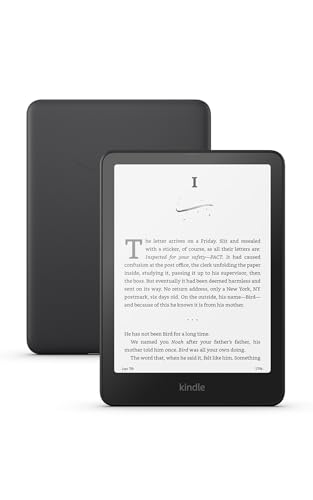
For most users, the Kindle Paperwhite hits the sweet spot. Its 6.8-inch screen is large enough to display panels clearly, its high resolution keeps text sharp, and its price is reasonable. For enthusiasts with a library of color titles or those who want the most immersive experience for detailed art, the Kindle Scribe Colorsoft is the top-tier choice, despite its higher price point.
What Are the Optimal Manga Formats for Kindle Devices?
The optimal
Different file formats offer varying degrees of compatibility and quality on Kindle e-readers. AZW3 (also known as KF8) is an excellent all-around choice, providing great image quality and compatibility with almost all Kindles released in the last decade. KFX is Amazon’s newest format, offering advanced rendering features like faster page turns and better handling of complex layouts, making it the best possible format for the latest Kindle models. Older formats like MOBI are now largely outdated for image-heavy content like
| Format | Base Compatibility | Conversion Needed for Optimal | Image Quality | Key Advantages |
|---|---|---|---|---|
| CBZ/CBR | Limited/Poor | Yes (KCC) | High potential post-conversion | Standard comic archive |
| MOBI | Good (older Kindles) | Yes (KCC/Calibre) | Variable, older standard | Widely supported historically |
| AZW3 (KF8) | Excellent | Recommended (KCC) | Very Good, high compatibility | Good image quality, wider Kindle support |
| KFX | Excellent (newer Kindles) | Recommended (KCC) | Best, advanced features | Fastest page turns, panel view support |
In practice, this means your workflow should almost always involve a conversion step. Starting with a high-quality CBZ or CBR file and converting it to AZW3 or KFX using Kindle Comic Converter is the proven method for achieving a reading experience that rivals or even surpasses physical
How Can You Access Manga for Kindle Cost-Effectively or for Free?
You can access
For budget-conscious readers, paying for every
- Kindle Unlimited: As mentioned, this subscription is one of the most popular methods for high-volume readers. It grants access to a large but curated selection of
manga series for a flat monthly rate. - Kindle Store Sales: Amazon frequently runs sales on digital
manga . Keep an eye on the Kindle Store for discounted volumes, series bundles, and daily deals. This is a great way to purchase titles you want to own permanently. - Publisher Giveaways: Many
manga publishers offer the first chapter or even the first volume of a series for free on the Kindle Store. This is a risk-free way to try a new series before you decide to buy. - Public Library Lending: Many public libraries have partnerships with digital lending services that include
manga . You may be able to borrowmanga e-books for your Kindle directly through your local library’s system.
It is important to stick to these legal avenues. While unofficial sources for free
What Are Common Problems When Reading Manga on Kindle and How Can You Solve Them?
When reading
From practical experience, here are some of the most frequent issues and how to fix them:
- Problem:
Manga looks blurry or pixelated.- Solution: This is often due to low-quality source images or incorrect KCC settings. Ensure your original files are high resolution. In KCC, try enabling the “Upscale” option to increase the resolution to match your Kindle’s screen and adjust the “Gamma” setting to improve contrast.
- Problem: Pages are in the wrong order or turn the wrong way.
- Solution: This happens when the reading direction isn’t set correctly. In KCC, you must check the “Manga mode” box. This tells the Kindle to process the book as a right-to-left reading experience, which is standard for
manga .
- Solution: This happens when the reading direction isn’t set correctly. In KCC, you must check the “Manga mode” box. This tells the Kindle to process the book as a right-to-left reading experience, which is standard for
- Problem: The file won’t open on my Kindle.
- Solution: This could be a format compatibility issue. Ensure you are converting to AZW3 or KFX, as older Kindle models may not support newer formats. Also, verify that the file was not corrupted during download or transfer. Try converting and transferring the file again.
- Problem: Page turns are very slow.
- Solution: Slow performance is common with unoptimized files. Converting to the KFX format, if your device supports it, can dramatically improve page-turn speed. Reducing the file size by lowering image quality slightly in KCC can also help on older devices.
How Can You Enhance Your Manga Reading Experience on Kindle?
To significantly enhance your
For enthusiasts who have mastered the standard conversion process, these “power user” tips can elevate the experience even further:
- Create Custom KCC Profiles: If you read different types of
manga (e.g., modern high-contrast series vs. older series with grayscale art), you can create and save different conversion profiles in KCC. This allows you to apply the perfect gamma and sharpening settings for each style with a single click. - Advanced Calibre Organization: Go deeper with Calibre’s metadata. Use its “Manage series” and “Manage authors” features to keep your library pristine. You can even create custom columns to track things like “Publisher” or “Genre,” which allows for powerful sorting and filtering of your collection.
- Use Collections on Your Kindle: After organizing in Calibre, use your Kindle’s “Collections” feature to group series together. This makes browsing on the device much cleaner than scrolling through hundreds of individual volumes.
- Explore Device-Specific Features: Familiarize yourself with your Kindle’s display settings. Adjusting font sizes (for any text elements), page refresh frequency, and screen warmth can reduce eye strain and make marathon reading sessions more comfortable.
By investing a small amount of extra time in organization and optimization, you can create a seamless and personalized
FAQs About how to read manga on kindle
Can You Read Manga on Any Kindle Device?
Yes, you can read
Is It Better to Read Manga on a Kindle Paperwhite or a Tablet?
For black-and-white
What is the Difference Between CBZ/CBR and AZW3/KFX Formats for Manga on Kindle?
CBZ/CBR are simply zipped archives of images, not true e-book formats, and are not optimized for Kindle.. In contrast, AZW3 (KF8) and KFX are Amazon’s proprietary e-book formats. They provide a much better reading experience with features like faster page turns, proper scaling, and support for Kindle-specific functions, which is why conversion is so important.
Can Kindle Unlimited Be Used to Read Manga for Free?
A Kindle Unlimited subscription allows you to borrow and read a large selection of
Why Does My Manga Look Pixelated or Poor Quality on My Kindle?
Manga can appear pixelated if the source files were low resolution or if the conversion settings were not optimized.. To fix this, always start with high-quality source files. In Kindle Comic Converter (KCC), use options like “Upscale” to match your screen’s resolution and adjust “Gamma” to improve image contrast.
How Can I Get Manga Pages to Turn in the Correct Direction on Kindle?
To ensure
Can I Read Color Manga on a Regular Black-and-White Kindle?
Yes, you can read color
Are There Any Legal Online Sources for Free Manga to Convert for Kindle?
Yes, legal sources for free
Is Calibre Necessary if I Use Kindle Comic Converter (KCC)?
While you can manually transfer files after using KCC, Calibre is highly recommended for its powerful library management features.. Calibre makes it easy to organize large collections, edit metadata like series and volume numbers, and seamlessly send files to your Kindle, creating a much more streamlined workflow.
How Do I Organize a Large Manga Collection on My Kindle?
The best way to organize a large
Key Takeaways: How to Read Manga on Kindle Summary
- Diverse Reading Methods: You can read
manga on Kindle either by purchasing directly from Amazon’s Kindle Store/Kindle Unlimited or by sideloading optimized files using tools like Kindle Comic Converter (KCC) and Calibre, offering flexibility for all users. - Optimal Format Conversion is Key: For the best visual quality and reading experience, convert your
manga files (especially CBZ/CBR) into Kindle-native formats like AZW3 or KFX using KCC, which allows for image optimization. - Kindle Model Matters for Experience: While all Kindles can read
manga , models like the Paperwhite excel for black-and-white, while the Kindle Scribe Colorsoft is ideal for vibrant, full-colormanga due to its advanced e-ink display. - Calibre Simplifies Management: Calibre is invaluable for managing your digital
manga library, allowing you to organize series, edit metadata, and efficiently transfer converted files to your Kindle device. - Cost-Effective Access is Possible: Explore options like Kindle Unlimited subscriptions, Amazon sales, or legal free chapters from publishers to build your
manga library without breaking the bank. - Troubleshooting Enhances Experience: Be prepared to troubleshoot common issues like poor image quality or incorrect page order, often resolved by re-optimizing files or adjusting KCC settings.
- Advanced Optimization for Enthusiasts: Fine-tune KCC settings for specific
manga genres and leverage Calibre’s advanced features for meticulous library organization to truly elevate your reading experience.
Final Thoughts on How to Read Manga on Kindle
Reading
Last update on 2026-04-28 / Affiliate links / Images from Amazon Product Advertising API


